 MoviePro
Record your first take#
- Save destination. Settings (1) › Storage › Save Destination. App Library is the default; you can change it to Photo Library, App Library & Photos, a Files folder or a connected SSD. Choose a save destination
- Codec, frame rate and format. Settings (1) › Video Format: Video Encoding, Color Mode, Resolution and Frame Rate. Codecs
Record, pause and stop#
- Tap Record (2) to start; the timer (4) runs.
- Tap Pause (3) to hold the take; it becomes Resume. Tap Resume to continue.
- Tap Stop (2) to end and save the take, paused or not.
Resume continues the same file in every recording mode, Dual Capture included. The paused stretch is left out: the timer stops, reads PAUSED in amber, and continues from where it stopped. The timecode track continues from the pause too, so after a pause a Time of Day timecode runs behind the clock. The Apple Watch starts and stops a take but cannot pause it.
For an automatic stop, set Settings › Camera › Record Duration (Unlimited by default). Keep MoviePro in the foreground: an interruption or leaving the app can end a take.
Read the Take Receipt#
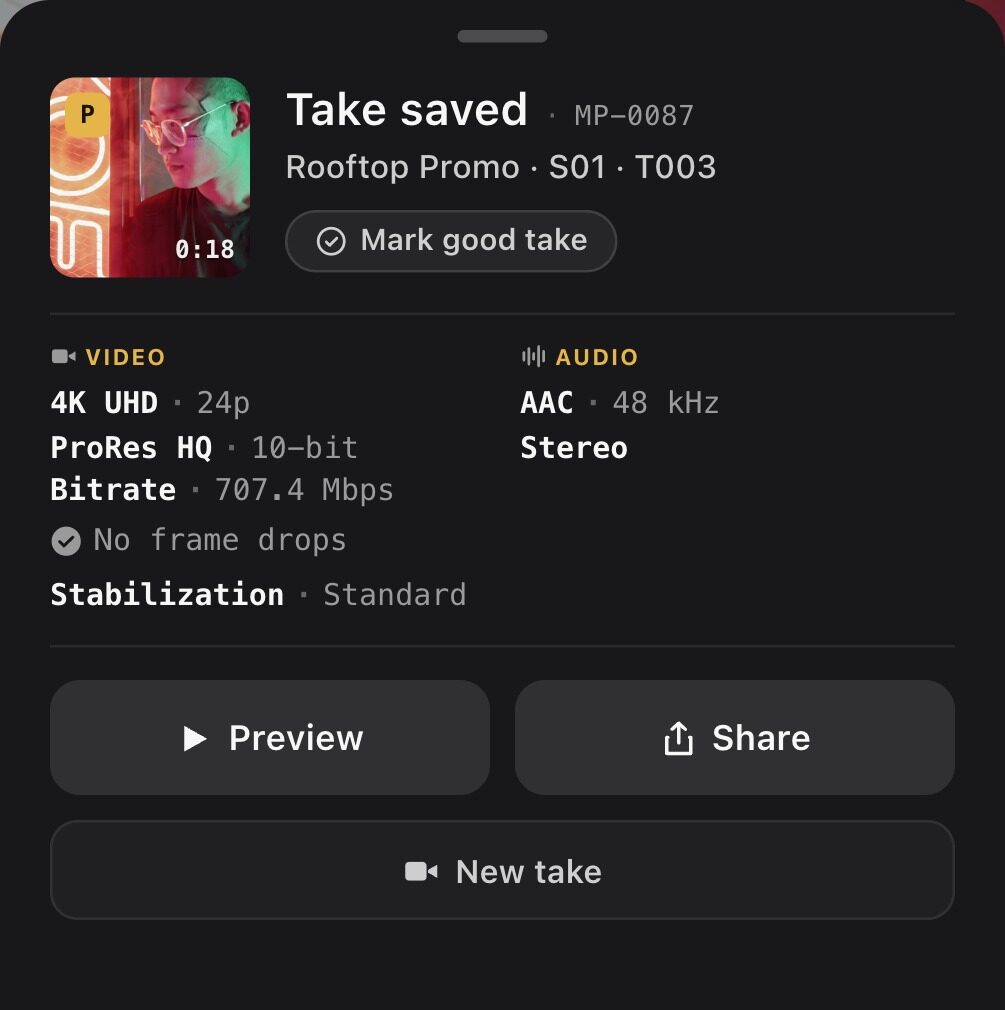
Open the details
With Take Receipt off, a brief summary appears after stopping. Tap it to open the full receipt. With the setting on, the full card opens after each take and remains until dismissed.
Change this under Settings › Interface Settings › Take Receipt. A failed take opens the failure receipt regardless of the preference.
Check the result
Read the save outcome first. Then inspect the format, audio, frame-drop information, stabilization, and any issue rows. A receipt can report a saved take that still needs inspection.
| Information | What to do |
|---|---|
| Save result / destination | Confirm that the file reached the intended location. |
| Recording with changes | Check the actual settings against the setup you intended. |
| Exposure lock | Inspect any requested-versus-observed mismatch. |
| Dropped frames / interruption | Play the affected part, including the end of an interrupted take. |
| Look | Check which conversion was recorded when Log baking was enabled. |
Use Preview to inspect the take, Share to export it, or New take to return to capture. The full card can also offer Mark good take.